Choose an edition
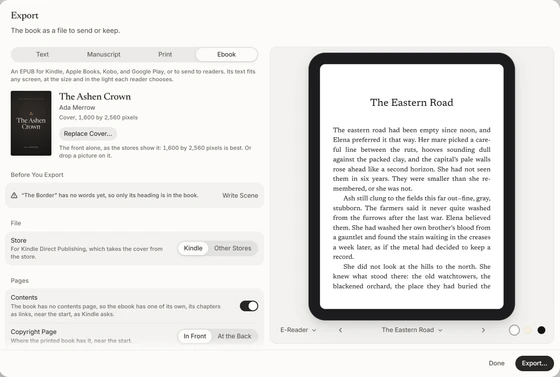
Export (File › Export…, or the menu under the book’s title) shows the edition’s settings beside the edition as it will be. Choose one at the top: Text, Manuscript, Print, or Ebook. Then Export… asks where to keep the file, and a notice says where it went. Each edition’s settings stay with the book, so it’s made the same way next time.
Above the settings, Before You Export lists anything worth seeing to, such as a scene with no words yet, a missing ISBN for print, or a picture without a description, each with the way to see to it. It never stops you.
The book is the same in every edition, and how it looks is its format (Book Format), never the edition’s.
Text
Markdown, for Pandoc, Obsidian, iA Writer, or your own records, or plain text, the words alone. One file, or a zip with a file for each chapter, numbered in reading order.
Manuscript
A Word document in standard manuscript format, as agents and editors ask for it: Times New Roman or Courier at 12 points, double-spaced, every paragraph indented, on Letter or A4. A title page with your details and the word count, each chapter on a new page, and a header on every page with your surname, the title, and the page number. Only the story goes in.
A PDF of the book’s pages for a printer or a print-on-demand service such as KDP or IngramSpark: the book exactly as you read it, page for page and line for line, its typefaces in it. Room for the Spine moves the text a little toward each page’s outer edge, more for a thicker book, so nothing disappears into the binding.
Ebook
An EPUB for Kindle, Apple Books, Kobo, Google Play, and every other store, set from the book’s format, its text reflowing to any screen at the size each reader chooses. Add the cover, and choose Kindle or Other Stores: the file is made, and named, for it. It can carry the book’s typeface, and mark where each page of the printed book begins, so readers can follow along with the paperback.
Every ebook passes EPUBCheck and Ace by DAISY, and converts cleanly in Kindle Previewer.